
 Expert verified
 | TL;DR Summary FSSAI licensing rules changed on April 1, 2026.New thresholds: Basic up to ₹1.5Cr, State ₹1.5Cr–₹50Cr, Central above ₹50Cr.Annual renewals are abolished; licenses now have perpetual validity. You still need to pay the annual fee and file returns, or your license gets suspended. E-commerce food sellers need a Central License, regardless of turnover. Central License applicants must submit geo-tagged photos of their facility. Operating without a valid FSSAI license carries fines up to ₹5 lakh and imprisonment up to 6 months. License applicants must submit geo-tagged photos of their facility as part of the FoSCoS application. |
From April 1, 2026, FSSAI licence thresholds are: Basic Registration up to ₹1.5 crore, State Licence ₹1.5 crore–₹50 crore, and Central Licence above ₹50 crore — annual renewals are abolished and licences now carry perpetual validity, but annual fee payment and filing the Food Safety Compliance Return (FSCR) by May 31 each year remain mandatory, and missing either triggers automatic suspension without notice; e-commerce food platforms require a Central Licence regardless of turnover.
Applications are filed on the FoSCoS portal (foscos.fssai.gov.in) with fees of ₹100/year for Basic, ₹2,000–5,000/year for State, and ₹7,500/year for Central — operating without a valid FSSAI licence attracts a fine up to ₹5 lakh and imprisonment up to 6 months, with repeat offences drawing double penalties plus up to ₹1 lakh per day.
If you are into a food business in India, your FSSAI license requirements changed from April 1, 2026 and ignoring the update could mean operating under the wrong license category or facing automatic suspension.
The amendment revised turnover thresholds, abolished renewals, and introduced new application requirements that every food business operator needs to know.
This guide covers everything you need to know about the new FSSAI license. We include the new Basic, State, and Central License thresholds, perpetual validity rules, documents required, step-by-step FoSCoS application process, fees, and penalties for non-compliance.
What Changed in FSSAI Licensing from April 2026?
Three major changes hit FSSAI licensing starting April 2026. You need to understand each one for your food business.
Turnover Thresholds Went Up
The government raised the turnover limits for the first time in years. This came from NITI Aayog’s High-Level Committee on Non-Financial Regulatory Reforms .
The goal was to reduce compliance burden on small businesses.
Here is what changed:
| License Type | Old Limit (Annual Turnover) | New Limit (From April 2026) |
| Basic Registration | Up to ₹12 lakh | Up to ₹1.5 crore |
| State License | ₹12 lakh – ₹20 crore | ₹1.5 crore – ₹50 crore |
| Central License | Above ₹20 crore | Above ₹50 crore |
If your business turnover is below ₹1.5 crore, you now qualify for Basic Registration. Before April 2026, you would have needed a State License once you crossed ₹12 lakh. That meant more paperwork, higher fees, and stricter inspections .
The same logic applies at the higher end. Businesses with turnover between ₹1.5 crore and ₹50 crore now fall under State License. Only those above ₹50 crore need a Central License.
No More Renewals for Your FSSAI License
Your FSSAI license no longer expires. This change became effective through the Amendment Regulations. Earlier, you had to renew every 1 to 5 years. You also had to apply 30 days before expiry.
Now one application. One certificate. No renewal cycle.
But you must understand this carefully. Perpetual validity does not mean zero compliance. You still must pay annual fees on time. If you miss the annual fee payment, your license gets deemed suspended automatically.
The government introduced this to cut paperwork and repeated office visits. Regulators can now spend time on enforcement instead of processing renewals.
New Digital and Compliance Requirements
April 2026 also brought other important changes:
E-commerce Central License Mandate:
If you are an online food platform: delivery app, marketplace, or aggregator, you must hold a Central FSSAI License. This applies regardless of your turnover.
The platform also needs to ensure every seller listed has a valid license.
Street Vendor Deemed Registration:
Already registered with a municipal corporation or town vending committee under the Street Vendors Act, 2014? You are now considered registered with FSSAI automatically. This benefits over 10 lakh street food vendors.
New Thresholds: Basic (₹1.5Cr), State (₹50Cr), Central (>₹50Cr)
If you were previously in the wrong category or hovering near an upgrade, it is worth checking where you now stand after the changes:
Basic Registration: Up to ₹1.5 Crore
This category covers small food businesses: petty manufacturers, small retailers, and local food vendors. The jump from ₹12 lakh to ₹1.5 crore is huge.
Home kitchens selling packaged foods online, small cloud kitchens, and micro food processors who were previously being pushed into State License territory can now operate under Basic Registration. Means lower fees and a simpler application process.
State License: ₹1.5 Crore to ₹50 Crore
This applies to medium-scale food manufacturers, regional restaurant chains, cold storage operators, food distributors, and catering services operating within one state.
The ceiling has more than doubled from ₹20 crore to ₹50 crore. This means a large portion of mid-size food businesses that were under Central License compliance will now fall under state authority oversight.
Central License: Above ₹50 Crore
This revised limit ensures that only truly large-scale operators come under central licensing. But turnover is not the only trigger.
There are activity-based requirements that apply regardless of how much your business earns:
- Any entity that imports or exports food, is 100% export-oriented, supplies food to Central Government agencies, or operates an e-commerce food business must obtain a Central License, regardless of turnover.
- If your business has units in more than one state, you need a Central License for your head office. Each individual unit will also need a separate license: Central or State based on its own turnover and capacity.
Selling food across state borders does not require a Central License. The Central License is triggered only when your business has physical premises or units located in more than one state.
Example: If you operate from a single location in Mumbai but ship products to Delhi, you do not automatically need a Central License.’
NOTE: E-commerce food businesses operating across states DO require a Central License for their head office regardless of turnover, even with only one physical premises.
What If Your Turnover Crosses a Threshold Mid-Year
Say you start the year at ₹1.2 crore turnover. You hold a Basic Registration. Halfway through the year, business booms, your projected annual turnover crosses ₹1.5 crore.
You must apply for a State license immediately.
Do not wait for the financial year to end. FSSAI looks at your actual turnover, not calendar years.
The same logic applies if you cross ₹50 crore. Upgrade to Central license within 30 days of crossing the threshold.
Perpetual Validity — No More Annual Renewal
This is the change every food business owner wanted. Your FSSAI license no longer carries an expiry date.
Most business owners misunderstand this. The reform removes the renewal burden. It does not remove compliance responsibility.
You still are obligated to:
- Annual fee is still mandatory: If you fail to pay your annual license fee, your license gets deemed suspended automatically. No notice or warning, just suspension.
- Food Safety Compliance Return (FSCR) filing continues: You must file your annual returns on time. Missing this deadline also triggers deemed suspension .
- Schedule 4 hygiene standards still apply: Your license validity does not exempt you from maintaining proper food safety practices .
Transition Rules for Existing Licenses
If your license was already valid on March 13, 2026, you carry forward under the new rules. You do not need to reapply. Your next obligation is simply the annual fee payment when it falls due.
But check your expiry date carefully. If your license expired before March 13, 2026 and you haven’t renewed it yet, you are not automatically covered. You must renew under the existing process first. Late renewal penalties of ₹100 per day continue to apply .
Which FSSAI License Do You Need? Decision Tree
Choosing the wrong license category is one of the most common FSSAI compliance mistakes.
Some businesses over-license and pay more than they need to. Others under-license and operate in violation without realising it.
The decision comes down to three things:
- your annual turnover
- nature of your business activity
- how many states you operate in.
1. Are you in a category that requires a Central License regardless of turnover?
The FoSCoS Kind-of-Business (KoB) eligibility matrix mandates a Central License regardless of turnover for any business that falls into the following categories:
- Importers
- E-commerce food platforms
- Nutraceutical and health supplement manufacturers
- Proprietary food makers
- Non-specified food and food ingredients manufacturers
- Ayurveda Aahara manufacturers
- 100% export-oriented units
- Exporter-manufacturers
- Trader/merchant exporters
- Radiation processing facilities
- 5-star and above hotels
- Airport and seaport food businesses
- Central Government agency premises
- Multi-state head offices or registered offices
2. Do you operate from premises in more than one state?
Food business operators with operations in more than one state must apply for a Central License at the head office or registered office level.
Each unit in each state then requires its own Central License, State License, or Registration, depending on that unit’s turnover and KoB eligibility.
3. What is your annual turnover?
If neither of the above applies, use turnover as your guide:
| Annual Turnover | License Required |
| Up to ₹1.5 crore | Basic Registration |
| ₹1.5 crore – ₹50 crore | State License |
| Above ₹50 crore | Central License |
For E-Commerce Sellers
Any entity that operates an e-commerce food business must obtain a Central License, irrespective of turnover.
This applies to the platform itself: Swiggy, Zomato, Amazon Pantry, Blinkit but individual sellers listing on those platforms are treated differently.
Individual sellers or restaurants listing on a platform need a Basic, State, or Central License based on their own size and turnover. The platform must also ensure that every seller listed has a valid FSSAI registration or license.
Documents Required for FSSAI Application
Gather documents before you open the FoSCoS portal. Most application rejections happen because people upload the wrong files or miss something basic.
Documents for Basic Registration (Form A)
This is the simplest category with a short list to help small businesses comply without hassle.
Here is what you need :
- Recent passport-size photograph of the applicant
- Identity proof: Aadhaar Card, PAN Card, or Voter ID
- Address proof of the business premises: Rent agreement, electricity bill, or water bill
- List of food categories to be handled
- Signed declaration of compliance with hygiene norms
Documents for State License (Form B)
You need everything from Basic Registration, plus the following:
Premises and Layout Documents
- Blueprint or layout plan of your processing unit showing dimensions in metres and operation-wise area allocation.
- Raw material storage must be physically separated from finished goods.
- Proof of possession of premises (sale deed, rent agreement, or electricity bill)
Equipment and Machinery Details
- Complete list of equipment and machinery with name, make/model, number of units, installed capacity, and horsepower
Safety and Compliance Documents
- Food Safety Management System (FSMS) plan. For manufacturers, this should be HACCP-based. For restaurants or retailers, a simpler safety plan works.
- Water analysis report from a recognised laboratory. Mandatory if you use water as an ingredient. The report must confirm potability.
- Source of raw materials: details of suppliers for meat, milk, and other ingredients where applicable
Business Entity Documents
- List of directors/partners/proprietor with full address, contact details, and government-issued ID proof
- Partnership deed, affidavit of proprietorship, or MoA and Articles of Association depending on your business structure
- Form IX: nomination of persons by a company along with board resolution authorising the signatory
- Authority letter with name and address of the responsible person nominated by the manufacturer
External Approvals
- NOC from municipality or local body
- GST registration certificate (if registered)
Documents for Central License (Form B)
You need every document listed for State License, plus:
- Import Export Code (IEC) certificate: mandatory for importers and exporters
- Manufacturing unit photos: clear photographs of your production facility
- Detailed plant layout: more comprehensive than State License requirement
- Pesticide residues report of water: only for packaged drinking water, packaged mineral water, or carbonated water manufacturers
- NOC from manufacturer: for relabellers and repackers
For e-commerce food platforms (turnover does not matter), you also need:
- List of all sellers on your platform
- Declaration that each seller holds a valid FSSAI license
- Platform’s own Food Safety Management System plan
NOTE: The e-commerce food platforms means this is applicable to the e-commerce platforms, not for sellers.
And the sellers who register on such platforms are required to get a licence based on their turnover.
Business-Type Specific Documents
Some business types need additional requirements regardless of license category:
| Business Type | Additional Document Required |
| Private Limited Company / LLP | MOA, AOA, or LLP Agreement |
| Partnership Firm | Partnership Deed |
| Milk / Meat processing unit | Source of raw materials, procurement plan |
| 5-star hotel | Star rating certificate from Ministry of Tourism (HRACC) |
| Transport business | Vehicle list with registration details |
| E-commerce food seller | Warehouse address if using third-party fulfilment |
Common Document Related Rejection Reasons: Fix These Before Submitting
- Rent agreement with less than 6 months validity at time of application
- Address mismatch across documents, the business address on your FSSAI application must exactly match the address on your rent agreement, GST certificate, and Shop and Establishment certificate, including spelling
- Uploading phone photos instead of flatbed scans: The FoSCoS portal rejects uploads that do not meet clarity and format standards
- Missing water test report for food manufacturing units
Check all of these before you submit. A single mismatch can push your application into a 60-day correction cycle.
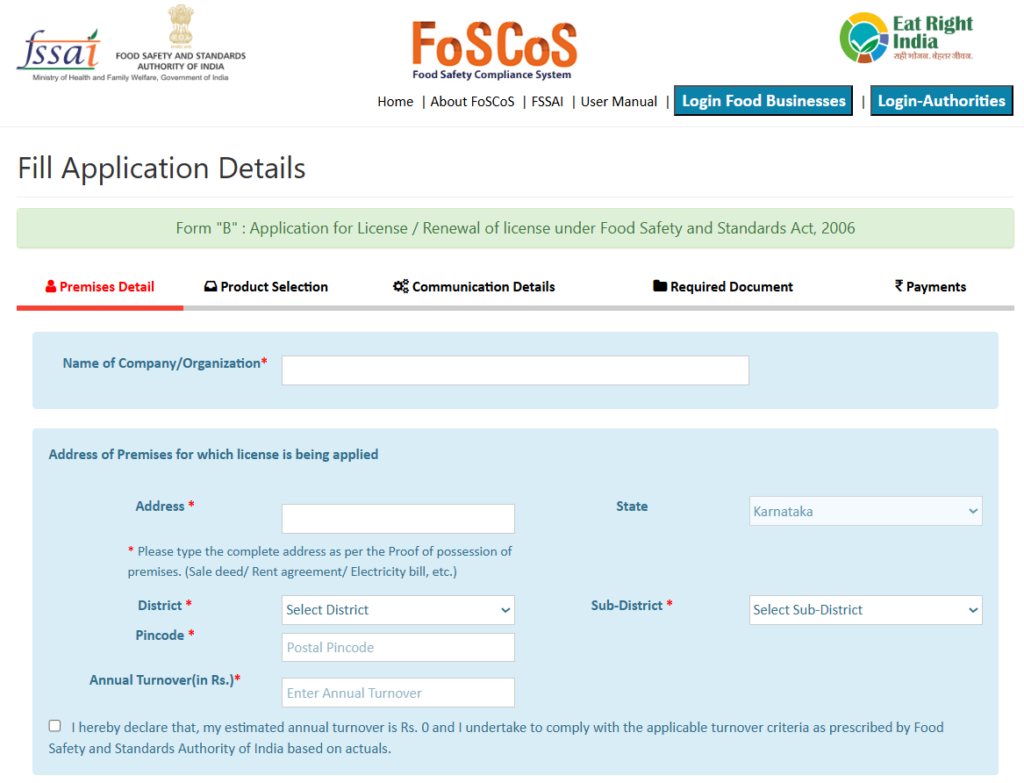
Step-by-Step Application on FoSCoS Portal
All FSSAI applications go through this single platform: The FoSCoS portal (Food Safety Compliance System).
Here I’ve explained step by step, the process about how to use it.
Step 1: Start the Application
Visit foscos.fssai.gov.in, click “Apply for New License/Registration”.
Select the ‘General’ tab. (If your business comes into the options railway station or airport/seaport you can select options accordingly).
Select your state. Choose the state where your business operates.
For Central License applications, you still select your home state first. The system redirects you to the central processing unit automatically.
Read the note that appears. It note contains state-specific instructions. Missing them causes rejection.
Step 2: Select Your Kind of Business (KoB)
The portal asks you to classify your business type. Options include:
- Manufacturer (you make food products)
- Restaurant (you serve prepared food)
- Trader/Retail (you sell but do not make)
- Transporter (you move food from one place to another)
- Importer/Exporter
- E-commerce platform
- Caterer
Choose carefully. Your selection determines which documents the system asks for later.
Select “Restaurant” if you are running a cloud kitchen. Select “Manufacturer” if you package anything.
Step 3: Enter Your Turnover
Enter the actual turnover number from your last financial year. Do not estimate. Do not round down to fit a lower category.
Based on your turnover and business type, the system tells you which license category you qualify for. If the portal shows a different category than what you expected, stop and verify.
Do not proceed until you understand why.
Step 4: Fill the Application Form
Basic Registration uses Form A. State and Central Licenses use Form B.
The form asks for:
- Applicant details (name, father’s name, date of birth)
- Premises address (exact location with pin code)
- Contact details (mobile and email – verify these twice)
- Number of years you want the license for
- List of food products or categories you handle
- Source of water supply
- Power connection details if applicable
After filling, click “Save & Next”. The portal then opens a map interface. Pin your business location on the map.
Geolocation pinning is required for most businesses (especially manufacturers, restaurants, large traders), but not for all categories like small retailers or transporters.
The portal will show/map interface only if applicable to you.
Step 5: Upload Documents
The portal shows document upload fields based on your KoB and license type. Upload each document in the correct field.
For State and Central License applications, upload:
- Photo ID proof (Aadhaar or PAN)
- Passport-sized photograph
- Business address proof (electricity bill or rent agreement)
- Layout plan or blueprint
- Water analysis report if applicable
- FSMS plan
- List of equipment with capacities
- Partnership deed or incorporation certificate
- Form IX nomination (for companies)
For Basic Registration, you only need photo, ID proof, address proof, and a self-declaration.
Name your files clearly. For example, “Water_Report_2026.pdf”. Do not name it like this “Scan001.pdf”.
Step 6: Pay the Fee
The portal shows your fee amount based on license category and selected validity period (between 1-5 years). You can pay for one year or more.
- Basic Registration: ₹100/year
- State License: ₹2,000–5,000/year
- Central License: ₹7,500/year
Payment options include UPI, net banking, credit card, and debit card. After successful payment, the system generates a 17-digit reference number.
Save this number, you need it to track your application.
NOTE: Since the 2026 amendment, fully online processing is the norm. Physical submission is rarely required unless the Designated Officer specifically requests it.
Most states now process everything digitally.
Step 7: Track and Respond
Log in to your dashboard regularly. Track your application through a 17-digit reference number. The portal shows your application status in real time.
If the authorities request additional information, you get 30 days to respond. Miss this deadline and your application gets rejected. You must start over from scratch.
Step 8: Inspection and Approval
- Basic Registration requires physical inspection. Certificate arrives in 7 to 14 days.
- State License requires a physical inspection. An officer visits your premises, checks your layout, verifies equipment, and reviews hygiene practices. Be present during inspection. Keep ready with all original documents.
- Central License inspections take longer. Expect 45 to 90 days for processing. Multiple officers may visit depending on your business scale.
Once approved, download your license certificate from the portal. The certificate includes a 14-digit license number and a QR code.
Display it prominently at your business premises. Put the license number on your menu, invoices, packaging, and online listings.
Geo-Tagged Photo Requirement: New in 2026
FSSAI has shifted towards digital verification through geo-tagging of business locations to confirm that the nature of the business matches what the FBO has declared in their application.
Who Does This Apply To?
The 2026 FoSCoS portal has added geo-tagged photos as a document requirement specifically for Central License applications.
Manufacturing units and large storage facilities are also subject to geo-tagging under the 2026 regulations.
If you are applying for Basic Registration or a standard State License for a non-manufacturing business, this requirement may not apply to you, but verify on the FoSCoS portal under your specific KoB before submitting.
What to Photograph?
You need clear photos of the entrance to the facility and the key operational zones.
For example, the kitchen entrance and food preparation area, with latitude and longitude timestamps visible in the image.
For manufacturing units, this usually means:
- The exterior of the facility showing the building entrance and signage
- The production floor or processing area
- The raw material storage area
- The finished goods or dispatch area
Each photo must have GPS coordinates embedded, not typed into a caption, but captured in the image metadata at the time of shooting.
How to Take a Geo-Tagged Photo
You do not need specialist equipment. A smartphone is sufficient:
- Enable location services on your phone before opening the camera app.
On Android: Settings → Location → turn on.
On iPhone: Settings → Privacy → Location Services → Camera → select “While Using.”
- Use your phone’s native camera app: Most Android and iPhone cameras embed GPS coordinates automatically in the EXIF metadata when location is enabled.
- Verify the coordinates are captured by checking the photo properties before upload. On Android, open the photo in Files or Gallery (Details). On iPhone, open the photo, swipe up to see the map and location data.
- Photograph on-premises, standing inside or directly at the entrance of the facility. Coordinates must correspond to your registered address, photos taken from outside the compound or from a nearby location will not match precisely enough.
- Upload as JPEG, the FoSCoS portal accepts JPEG for photo uploads. Do not convert to PDF, as this strips EXIF metadata including the GPS coordinates.
Fees: Basic ₹100, State ₹2,000–5,000, Central ₹7,500
What you pay depends on your license category and in the case of State Licenses, on your business activity and production capacity as well.
Government Fee Structure
Basic Registration costs ₹100 per year. State Licenses range from ₹2,000 to ₹5,000 per year. Central Licenses are fixed at ₹7,500 per year.
| License Type | Annual Government Fee |
| Basic Registration | ₹100/year |
| State License | ₹2,000 – ₹5,000/year |
| Central License | ₹7,500/year |
These are statutory government fees paid directly through the FoSCoS portal. They do not vary by city or state.
The State License Fee Has a Range: ₹2,000 – ₹5,000/year
For State Licenses, the fee within the ₹2,000 to ₹5,000 bracket varies based on your food business activity: manufacturer, trader, storage unit, or transporter and your installed production capacity.
A retailer with ₹5 crore turnover and a manufacturer with the same turnover will pay different fees.
The FoSCoS portal calculates the exact amount automatically based on your KoB selection, so you will see the precise figure before you confirm payment.
Penalties for Operating Without FSSAI
The Base Penalty Under Section 63:
Under Section 63 of the FSS Act, any person or food business operator who manufactures, sells, stores, distributes, or imports any food article without a license is punishable with imprisonment for a term extending up to six months, and a fine extending up to ₹5 lakh.
Repeat Offences
The penalty escalates sharply if you are caught a second time. Under Section 64, if a person already convicted of an offence commits the same again, they are liable to twice the punishment that was imposed on first conviction, along with an additional daily fine that may extend up to ₹1 lakh per day for continuing offences.
A business that continues operating after being penalized once is in a worse legal position. So, business advisory will help you to avoid making these mistakes.
PKC Business Compliance & Audit Advisory
FSSAI licensing is one piece of a larger compliance picture. For food businesses, whether you are a manufacturer, a distributor, or a D2C brand selling on quick commerce platforms, the regulatory stack includes GST, income tax, labour law, FSSAI, and for listed or funded entities, statutory audit.
Managing these is where most businesses run into trouble. This is where we at PKC Management Consulting can help.
We go beyond just obtaining your license. Our team conducts comprehensive compliance health checks, reviews your food safety management systems, and identifies gaps in labeling, packaging, storage, and documentation.
Whether you hold a Basic, State, or Central FSSAI license, our advisory helps you interpret complex legal provisions and implement robust internal controls.
Our audit support includes:
- Pre-audit readiness assessments
- Mock audits for FSSAI inspection preparedness
- Post-audit corrective action plans
- Renewal tracking and annual return filing assistance
With changing FSSAI rules (e.g., new labeling mandates, fortification requirements), proactive compliance is critical. PKC acts as your strategic partner, translating regulations into actionable workflows, training your team on food safety protocols, and reducing risk of non-compliance penalties or license cancellation.
Stay compliant. Stay confident. Let PKC handle the audits so you can focus on serving safe, quality food.
FAQs: FSSAI License
1. What is the new FSSAI threshold from April 2026?
From April 1, 2026, the revised turnover thresholds are: Basic Registration up to ₹1.5 crore, State License between ₹1.5 crore and ₹50 crore, and Central License above ₹50 crore.
Certain business types: importers, exporters, e-commerce food platforms, nutraceutical manufacturers, and multi-state operators, require a Central License regardless of turnover.
2. Is FSSAI renewal required after March 2026?
No. Licenses issued from April 1, 2026 carry perpetual validity, no expiry date, no renewal form. However, two annual obligations remain: pay the annual license fee and file the Food Safety Compliance Return (FSCR) by May 31 each year.
Missing either triggers automatic suspension. Perpetual validity eliminates the renewal cycle, not the compliance requirements.
3. Do I need FSSAI if I sell food on Zomato or Amazon?
Yes. Every food seller needs a valid FSSAI registration or license, regardless of which platform they use.
Your license category depends on your own turnover and business type, not the platform’s. The platform itself holds a separate Central License and is required to verify that every listed seller has valid FSSAI credentials.
4. What is a geo-tagged photo and why does FSSAI require it?
A geo-tagged photo has GPS coordinates embedded in its file metadata, captured at the moment of shooting. FSSAI uses these coordinates to verify that your declared facility address is accurate.
It is mandatory for Central License applications and manufacturing units. Use a smartphone with location services enabled, and upload the original JPEG, converting to PDF strips the GPS data and will flag your application.
5. How long does FSSAI license approval take?
Basic Registration takes 7 to 10 working days; Tatkal applications are processed within 48 hours. State License approvals take 30 to 60 days, including a physical inspection for manufacturing units. Central License applications take 60 to 90 days.
These are standard timelines for complete applications, document errors or address mismatches will extend processing.
6. Is FSSAI mandatory for home-based food businesses?
Yes, if you are selling food commercially: including through WhatsApp, Instagram, or delivery apps. The exemption under Section 31(2) of the FSS Act applies only to food made for personal, non-commercial consumption.
The moment you charge for food, registration is required. Most home kitchens fall under Basic Registration, which costs ₹100 per year and has minimal documentation requirements.
7. What is the penalty for operating without FSSAI?
Under Section 63 of the FSS Act, operating without a license carries imprisonment of up to 6 months and a fine up to ₹5 lakh. Repeat offences attract double the punishment plus a daily fine of up to ₹1 lakh.
If non-compliance causes consumer death, the penalty escalates to a minimum ₹10 lakh fine and up to life imprisonment. Directors and partners can be individually prosecuted, not just the business entity.